Barista app icon For macOS

Everything you need.
One click away on your menu bar.

35+ widgets for your menu bar. A single, polished home for the calendar, email, clipboard, weather, stocks, daily utils, system stats and everything in between, one click away without messing with your open windows.

Out of menu bar space? Between the notch and every other app there's never enough. Barista's own bar holds them all, one click or keystroke away, however full macOS gets.

35+ Bar Menu Widgets

Everything you need, one click away.

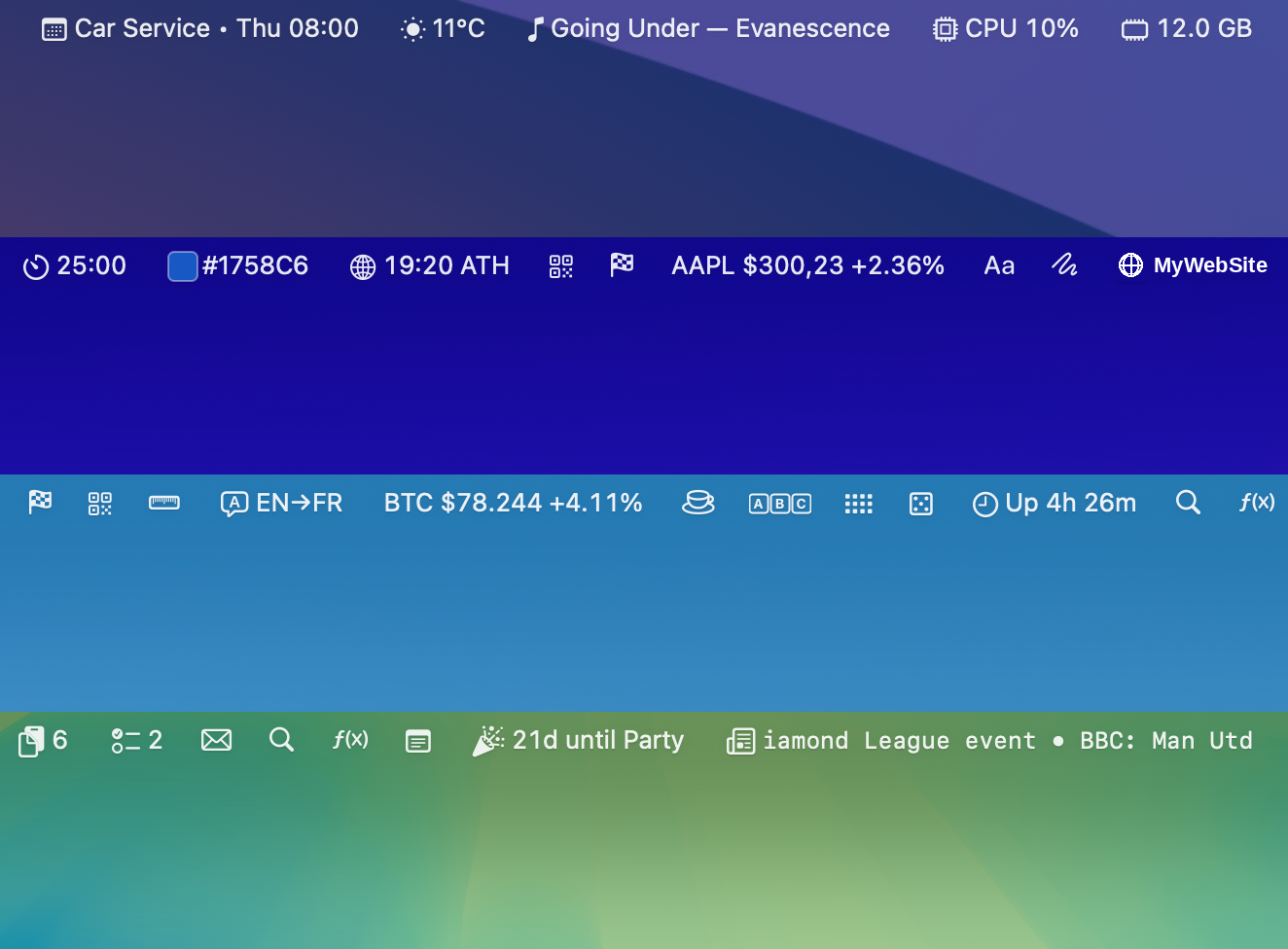
A collage of Barista menu-bar rows packed with widgets, clock, weather, stocks, calendar, network, news, battery and more.
Bar management

No bar space? No problem.

Barista keeps every widget you care about visible and one click away, even when the bar is full.

  • The Barista bar: a dedicated menu bar that can host Barista widgets. Move it, theme it, dismiss it or set it to always on, it's one click/key shortcut away.
  • Collapse to a single icon: fold every widget down to one icon that opens the Barista bar, reclaiming the whole menu bar in one click.
  • Expanded or Compact: widgets icon + text, or a minimal icon / single value. Mix and match per widget.
  • Per-screen widget setup: choose which widgets appear on which display. Different layout on your macbook screen vs. your external monitor, remembered automatically.
Email

Your full email client, right there on the bar.

The Email widget speaks IMAP and SMTP directly, no third-party server. Gmail, iCloud, Yahoo and AOL out of the box. Compose, Reply, Reply All, Forward, Mark read/unread, all in-place, no handoff to another mail client.

  • Multi-account inbox with per-account collapse.
  • Glance at your emails right from the bar, one click, no app switch.
  • Keyboard nav: ↑/↓ to move, Enter to open.
Clipboard

Your clipboard history, searchable and pinned.

A running history of everything you copy, text, links, files and images, kept right in the bar. Encrypted at rest, password managers filtered out, never uploaded. Search it, pin what you reuse, and name the pins so they are easy to find.

  • Full history of text, links, files and images.
  • Filter by type: Links, Text, Files, Images.
  • Pin anything to the top so it is always one click away.
  • Give pinned items a name (and a quick paste trigger).
  • Search the whole history; per-app blocklist and pause.
Calendar & Reminders

Your next event, always one glance away.

From all your accounts added to Apple Calendar, plus your Reminders lists. Not just read-only: see what's next, create and update events, manage reminders, and jump straight into your meeting, all from the bar.

  • Month grid with event dots, click any day for its agenda.
  • Create and edit events right in the popover.
  • Join the next meeting in one click, Zoom / Meet / Teams / Webex links detected automatically.
  • Reminders: view today and upcoming, check them off, and add new ones.
  • Click any event to open it in Calendar.app.
News

A scrolling headline. A real feed reader. No tab tax.

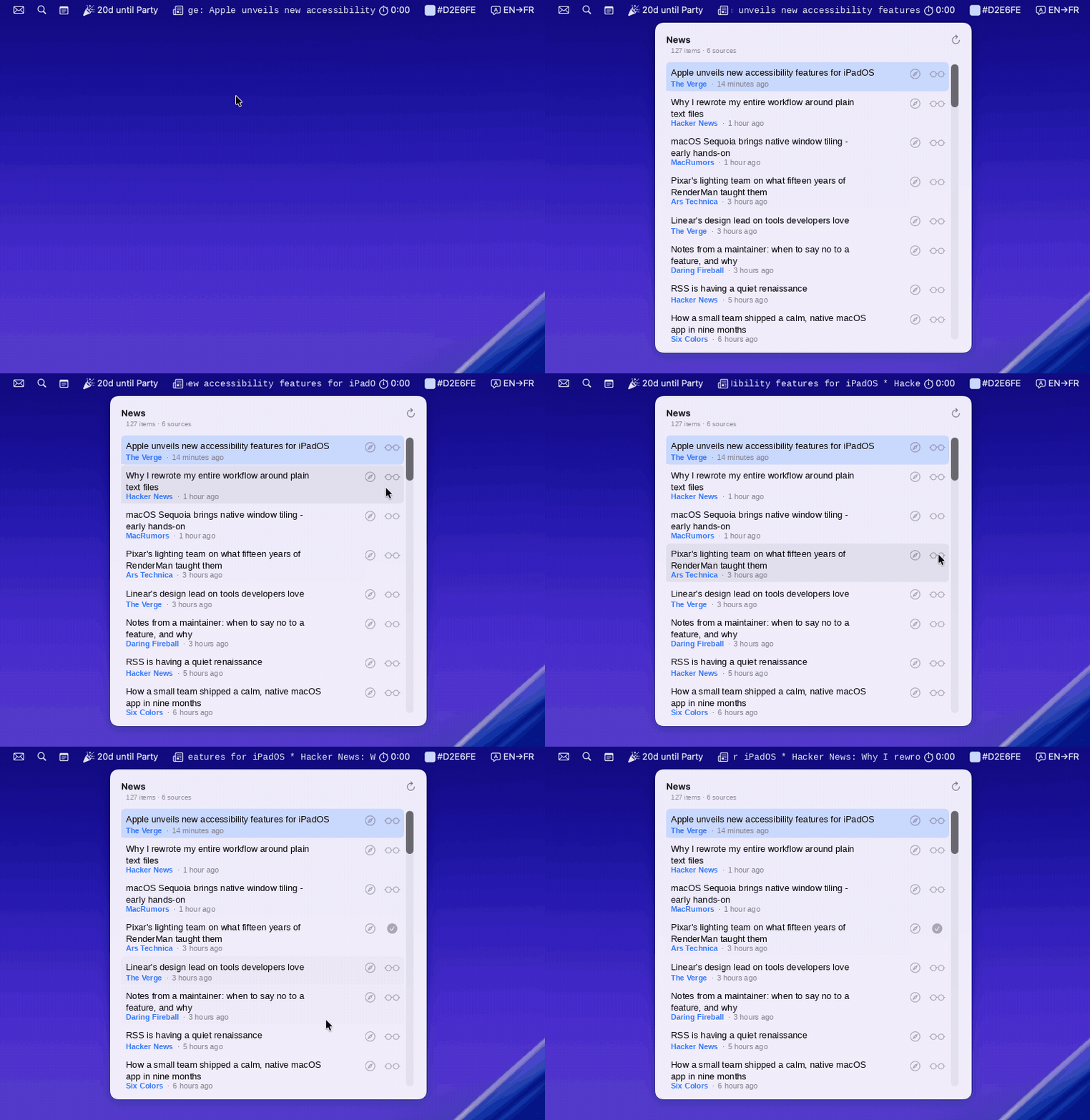
RSS/Atom aggregator. A rotating headline at a fixed monospaced width sits in the bar; the popover gives you a per-source-filtered feed in either grouped or timeline view.

  • Add any RSS or Atom feed, your favorite news sites and blogs right on your bar.
  • Grouped (collapsible per source) or Timeline layout.
  • Add to Safari Reading List right from the list.
  • Open the source article in your browser.
Utilities

The little tools you reach for ten times a day.

Color Picker, QR Generator, Scratchpad, Translate, Unit Converter, Now Playing, Search, Calculator, Text Tools, Shortcuts Runner. The minor utilities that don't deserve their own app, but you'd miss if they weren't there.

  • Color Picker: eyedropper from anywhere on screen, hex / RGB / HSL output.
  • QR Generator: paste text or a URL, scan-ready code in the popover.
  • Scratchpad: a quick notes pad, autosaved every keystroke.
  • Translate: text input, language pair, instant.
  • Unit Converter: length, weight, temperature, volume, time, area, speed.
  • Now Playing: album art, play/pause/next/prev, scrubbing for Spotify and Apple Music.
  • Search: Google / DDG / Wikipedia / GitHub / IMDb / Amazon and any other custom search.
  • Calculator: iOS-style pad, hardware-keyboard friendly.
  • Text Tools: manipulate text: trim, base64, Upper/Lower case, URL encode, all copied to clipboard.
  • Shortcuts Runner: bind any macOS Shortcut to a bar icon, click → Run → captured output.

Webpage

Pin any URL to your menu bar.

A meta-widget: each Webpage you add becomes its own bar item, complete with the site's favicon. Click for a popover, your favourite news site, a status page, sports results, anything, one click away.

  • Add as many as you want, each gets its own slot.
  • Favicon resolved automatically, no need to provide an icon.
  • Click to load the page inline; reload and open-in-browser buttons.
Weather

The sky, in your menu bar.

Live weather pulled from Open-Meteo. The bar shows the current temperature and a condition icon; click for the full picture, hourly through tomorrow, daily through the week.

  • Current + 24-hour hourly + 7-day outlook in one popover.
  • °C / °F toggle.
  • Location picker with geocoding search, type a city, pick it.
Stocks, Crypto and FX

Every ticker, its own slot in the bar.

Stocks, crypto, FX. Each ticker is its own bar item with live price and 24h change. Click for a Swift Chart with 24h / 7d / 1m range picker.

  • Compact: BTC €69.4K. Expanded: BTC €69,491 +1.20%.
  • 24h / 7d / 1m range picker in the popover chart.
  • Display currency conversion (USD → EUR, etc).
  • Add as many tickers as you have bar space for.
System & Network

CPU, memory, battery, network, sanctioned APIs only.

Six widgets that cover the system at a glance. No private frameworks, no kernel extensions. Every metric comes from a sanctioned API and ships in the same sandboxed App Store build.

  • CPU: system-wide percentage
  • Memory: used RAM
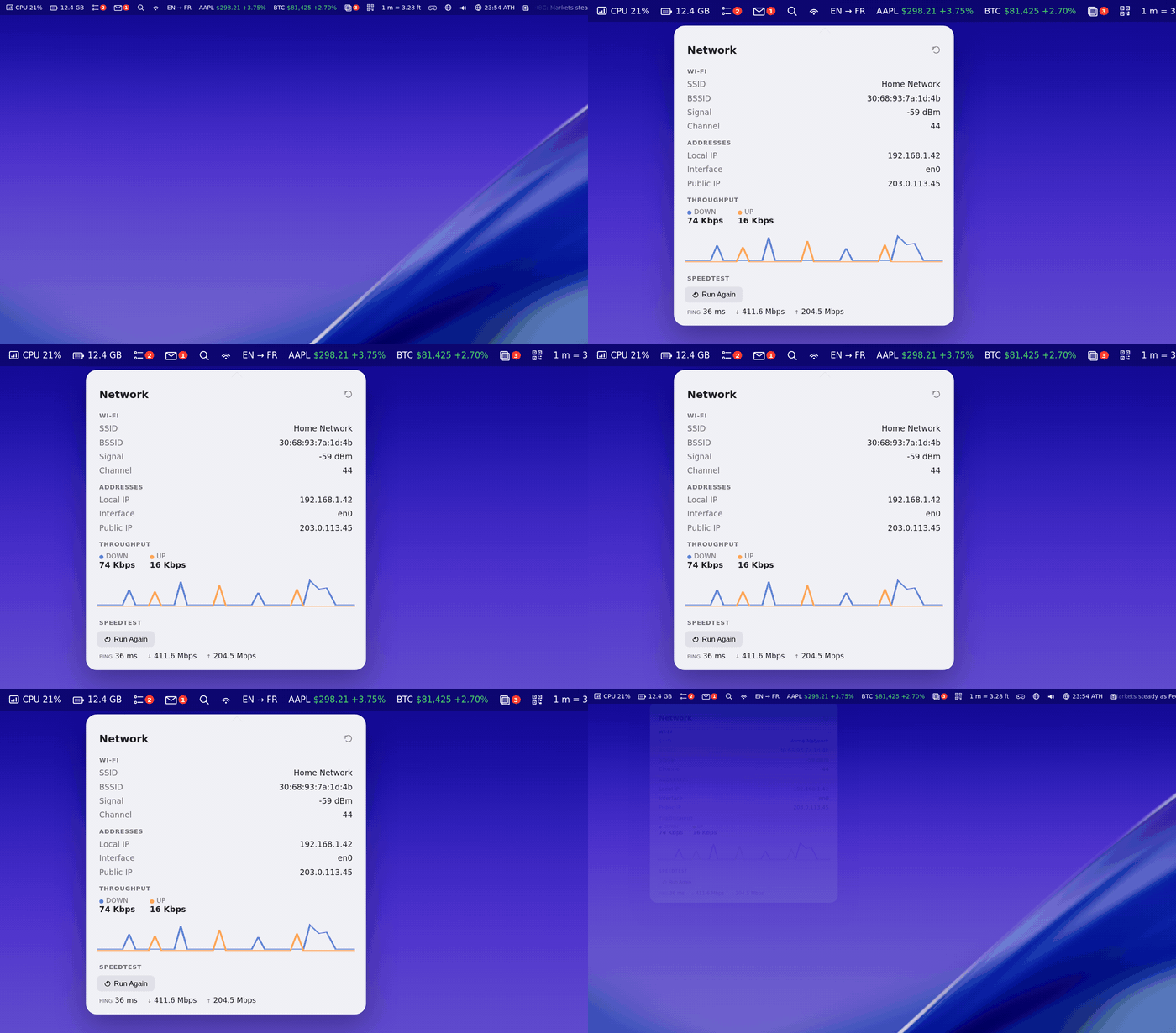
  • Network: SSID/RSSI, local IP, public IP, up/down throughput, speedtest.
  • Battery+: %, charging state, charge history, capacity-health timeline.
  • Audio Input/Output: switch input and output devices from one click.
  • System: uptime, mounted disks, host name, macOS version.
Timers & Focus

Track time. Remember the trip.

A small family of time-based widgets, for when you want a countdown to a special event, a focus timer, different time zones, or just to keep your Mac from sleeping during a presentation.

  • Focus / Interval Timer: work/break interval cycles, plus a plain stopwatch mode.
  • World Clocks: track multiple cities and time zones at once.
  • Event Countdown: "5d until Party!" or "122d since my resolution".
  • Caffeine: keep your Mac awake with one click.
Games (yes, really)

A two-minute distraction in your menu bar.

Sometimes you need ninety seconds of something else. A handful of bite-sized games that live in a popover and never demand more than a coffee break.

  • 2048: slide the tiles, full keyboard support.
  • Minefield: classic sweeping fun.
  • Word Guess: five-letter, on-screen and hardware keyboard.
  • Snake: the classic, right in the popover.
  • Lights Out: flip the grid until every light is off.
  • Idle Clicker: tap, upgrade, watch the numbers go up.
  • Quick Decision: spin the wheel; the universe decides.
Built to belong on macOS

The qualities that don't need a GIF.

Things you can't easily film, but you feel after a day with the app.

One settings window

The antidote to ten different preferences windows. Grouped by category, toggle a widget on, click the gear for its own settings, and ⌘-drag widgets in the menu bar to reorder them.

One process, not a dozen

Ten menu-bar apps mean ten background processes, ten auto-updaters, ten Login Items. Barista is one app: one process, one launch, one thing to manage and keep updated.

Sandboxed & reviewed

Single Mac App Store build. No private APIs, no shell access, no entitlements the sandbox forbids. Permissions asked widget-by-widget.

Full keyboard control

↑/↓/Enter inside lists, ⌘W dismisses, ⌘, jumps to settings, ⌘P pins any popover as a floating window.

Pin to float (⌘P)

Any popover can become a free-floating mini-window with one keystroke. Watch a chart or feed while you work in another app.

One app to rule them all

No more hunting down a separate app for the calendar, another for the clipboard, another for stocks. Everything's already here, in one place, ready to enable.

The full catalog

35+ menu bar widgets.

All included, enable the ones you want, all managed from one single dashboard.

Calendar
Weather
Now Playing
Battery+
CPU
Memory
Network
Clipboard
Reminders
Email
Stocks & Crypto
News
Search
Calculator
Scratchpad
Webpage
Shortcuts Runner
System
Event Countdown
World Clocks
Focus / Interval Timer
Translate
Color Picker
QR Generator
Audio Input/Output
Unit Converter
Caffeine
2048
Minefield
Word Guess
Quick Decision
Text Tools
Snake
Lights Out
Idle Clicker
Pricing

Pay once.

No subscriptions, no nag screens, no ads. One purchase, all widgets.

Mac App Store
$19.99One-time purchase
Coming soon
Press kit

For media & reviewers.

Logos, screenshots, and product descriptions in one bundle.

Download press kit